¶ Fuellstandsmessung-Zisterne
Den größten Teil der Anleitung habe ich von hier, Update 2023 - zuverlässiger und genauer messen:
Runter scrollen bis etwa 2/3 des Textes ereicht sind und das da steht: Update 2023 - zuverlässiger und genauer messen
https://fricklr.com/de/wasserstand-in-zisternen-mit-homeassistant-esphome-und-tl-136-drucksensor-messen/
Hier den Bauplan für den Sensor & die Anzeige:
Sensor
https://media.fricklr.com/wasserstand-in-zisternen-mit-homeassistant-esphome-und-tl-136-drucksensor-messen/tl-136-sensor.webp


Yaml Code für den ESPHomeBuilder in HomeAssistant
captive_portal:

  # i2c Bus auf D1 und D2 konfigurieren
i2c:
  id: bus_a
  sda: D2
  scl: D1
  scan: True

# ADC einrichten, ADDR-Pin ist auf VCC gelegt, daher Adresse 0x49 = https://esphome.io/components/sensor/ads1115.html, hier wegen gain: https://forum.arduino.cc/t/analogwerte-schwanken-nach-neustart-ungenau-mit-ads1115-gy-61-am-esp8266/1214305
ads1115:
  - address: 0x49
    id: ads1115_49

# ADC Kanal A0 zur Messwerterfassung
sensor:
  - platform: ads1115
    multiplexer: 'A0_GND'
    gain: 4.096   #oder diese Zahl?= 1.024*6 = 6.144
    name: "Wasserstand Zisterne cm"
    id: levelraw
    update_interval: 60s
    unit_of_measurement: "cm"
    accuracy_decimals: 1
    icon: "mdi:car-coolant-level"
# Messwerte glätten:
    filters:
      - sliding_window_moving_average:
          window_size: 20
          send_every: 20
# Spannungen nach Messreihe in Füllhöhe cm umrechnen
      - calibrate_linear:
          - 0.286 -> 0.0
          - 0.5 -> 23.0
          - 0.73 -> 46.0
          - 0.97 -> 69.0
          - 1.21 -> 92.0
          - 1.45 -> 115.0
          - 1.69 -> 138.0
          - 1.90 -> 161.0
          - 2.16 -> 184.0
          - 2.40 -> 207.0
          - 2.66 -> 230.0

# Spannungen nach Messreihe in Prozent Füllhöhe umrechnen
  - platform: template
    name: "Zisterne %"
    lambda: |-
      return id(levelraw).state;

    filters:
      - calibrate_linear:
          - 0.0 -> 0
          - 23.0 -> 10
          - 46.0 -> 20
          - 69.0 -> 30
          - 92.0 -> 40
          - 115.0 -> 50
          - 138.0 -> 60
          - 161.0 -> 70
          - 184.0 -> 80
          - 207.0 -> 90
          - 230.0-> 100
      #- round: 1 # will round to 1 decimal place
    unit_of_measurement: "%"
    accuracy_decimals: 0

# Füllmenge nach Füllstandskurve Liter berechnen

  - platform: template
    name: "Zisterne Liter"
    lambda: |-
      return id(levelraw).state;

    filters:
      - calibrate_linear:
          - 0.0 -> 0
          - 11.5 -> 380
          - 23.0 -> 760
          - 34.5 -> 1140
          - 46.0 -> 1521
          - 57.5 -> 1901
          - 69.0 -> 2281
          - 80.5 -> 2661
          - 92.0 -> 3041
          - 103.5 -> 3421
          - 115.0 -> 3802
          - 126.5 -> 4182
          - 138.0 -> 4562
          - 149.5 -> 4942
          - 161.0 -> 5322
          - 172.5 -> 5702
          - 184.0 -> 6082
          - 195.5 -> 6463
          - 207.0 -> 6843
          - 218.5 -> 7223
          - 230.0-> 7603

    unit_of_measurement: liter
    accuracy_decimals: 0

  - platform: wifi_signal # Reports the WiFi signal strength/RSSI in dB
    name: "WiFi Signal dB"
    id: wifi_signal_db
    update_interval: 60s
    entity_category: "diagnostic"
  - platform: copy # Reports the WiFi signal strength in %
    source_id: wifi_signal_db
    name: "WiFi Signal Percent"
    filters:
      - lambda: return min(max(2 * (x + 100.0), 0.0), 100.0);
    unit_of_measurement: "% Signal"
    entity_category: "diagnostic"
    device_class: ""
¶ Gaugen
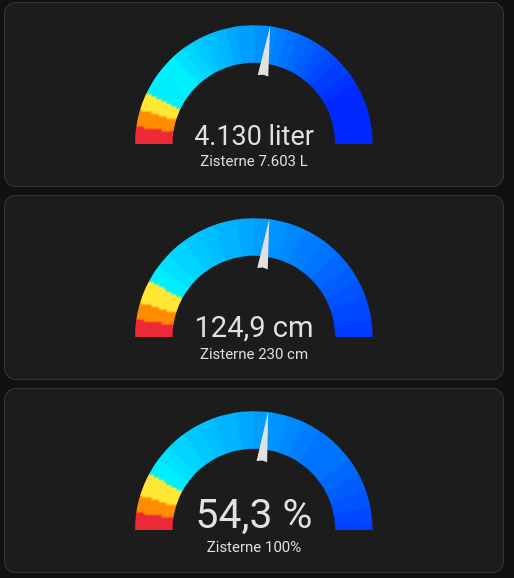
¶ yaml Code in Liter (Gauge Card Pro-Karte anpassen)
type: custom:gauge-card-pro
entity: sensor.wasserstand_zisterne_liter
needle: true
segments:
  - from: 0
    color: "#ED2938"
  - from: 350
    color: "#FF8C01"
  - from: 700
    color: "#ffe733"
  - from: 1050
    color: "#00efff"
  - from: 2000
    color: "#00DFFF"
  - from: 2250
    color: "#00D4FF"
  - from: 2500
    color: "#00C9FF"
  - from: 2750
    color: "#00BEFF"
  - from: 3000
    color: "#00B4FF"
  - from: 3250
    color: "#00A9FF"
  - from: 3500
    color: "#009EFF"
  - from: 3750
    color: "#0093FF"
  - from: 4000
    color: "#0089FF"
  - from: 4250
    color: "#007EFF"
  - from: 4500
    color: "#0073FF"
  - from: 4750
    color: "#0068FF"
  - from: 5000
    color: "#005EFF"
  - from: 5250
    color: "#0053FF"
  - from: 5500
    color: "#0048FF"
  - from: 5750
    color: "#003DFF"
  - from: 6000
    color: "#0033FF"
  - from: 6250
    color: "#0028FF"
unit: Liter
min: 0
max: 7603
titles:
  primary: Zisterne 7.603 L
yaml Code in cm (Gauge Card Pro-Karte anpassen)
type: custom:gauge-card-pro
entity: sensor.wasserstand_zisterne_cm
needle: true
segments:
  - from: 0
    color: "#ED2938"
  - from: 11.5
    color: "#FF8C01"
  - from: 23
    color: "#ffe733"
  - from: 34.5
    color: "#00efff"
  - from: 46
    color: "#00DFFF"
  - from: 57.5
    color: "#00D4FF"
  - from: 69
    color: "#00C9FF"
  - from: 80.5
    color: "#00BEFF"
  - from: 92
    color: "#00B4FF"
  - from: 103.5
    color: "#00A9FF"
  - from: 115
    color: "#009EFF"
  - from: 126.5
    color: "#0093FF"
  - from: 138
    color: "#0089FF"
  - from: 149.5
    color: "#007EFF"
  - from: 161
    color: "#0073FF"
  - from: 172.5
    color: "#0068FF"
  - from: 184
    color: "#005EFF"
  - from: 195.5
    color: "#0053FF"
  - from: 207
    color: "#0048FF"
  - from: 218.5
    color: "#003DFF"
  - from: 230
    color: "#0033FF"
  - from: 235
    color: "#0028FF"
min: 0
max: 231
titles:
  primary:
    value: Zisterne 230 cm
yaml Code in % (Gauge Card Pro-Karte anpassen)
type: custom:gauge-card-pro
entity: sensor.wasserstand_zisterne_prozent
needle: true
segments:
  - from: 0
    color: "#ED2938"
  - from: 5
    color: "#FF8C01"
  - from: 10
    color: "#ffe733"
  - from: 15
    color: "#00efff"
  - from: 20
    color: "#00DFFF"
  - from: 25
    color: "#00D4FF"
  - from: 30
    color: "#00C9FF"
  - from: 35
    color: "#00BEFF"
  - from: 40
    color: "#00B4FF"
  - from: 45
    color: "#00A9FF"
  - from: 50
    color: "#009EFF"
  - from: 55
    color: "#0093FF"
  - from: 60
    color: "#0089FF"
  - from: 65
    color: "#007EFF"
  - from: 70
    color: "#0073FF"
  - from: 80
    color: "#0068FF"
  - from: 85
    color: "#005EFF"
  - from: 90
    color: "#0053FF"
  - from: 95
    color: "#0048FF"
  - from: 100
    color: "#003DFF"
  - from: 105
    color: "#0033FF"
  - from: 110
    color: "#0028FF"
name: Zisterne
min: 0
max: 101
unit: "%"
severity:
  green: 0
  yellow: 0
  red: 0
titles:
  primary: Zisterne 100%
¶ Andere Anzeige
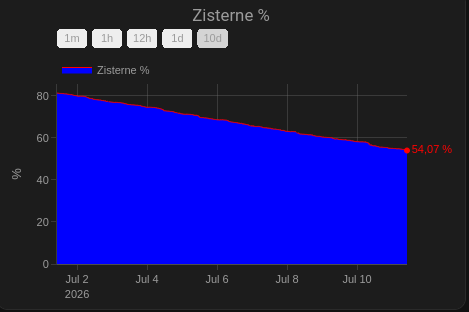
yaml Code in % (custom:plotly-graph anpassen)
type: custom:plotly-graph
entities:
  - entity: sensor.wasserstand_zisterne_prozent
    name: Zisterne %
    show_value: true
    fill: tozeroy
    fillcolor: blue
    line:
      color: red
      dash: bar
      witdh: 1
title: Zisterne %
logarithmic_scale: true
refresh_interval: 10
hours_to_show: 10d
layout:
  xaxis:
    rangeselector:
      "y": 1.2
      buttons:
        - count: 1
          step: minute
        - count: 1
          step: hour
        - count: 12
          step: hour
        - count: 1
          step: day
        - count: 10
          step: day
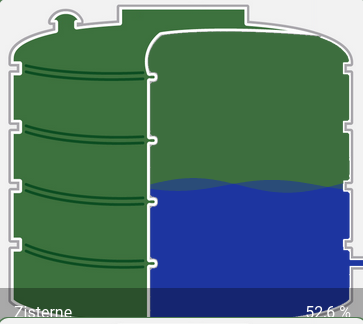
yaml Code in % (custom:fluid-level-background-card anpassen)
type: custom:fluid-level-background-card
card:
  show_state: true
  show_name: true
  camera_view: auto
  fit_mode: cover
  type: picture-entity
  image: /local/wassertank/OilTank.png
  entity: sensor.wasserstand_zisterne_prozent
  name: Zisterne
entity: sensor.wasserstand_zisterne_prozent
fill_entity: sensor.wasserstand_zisterne_prozent
background_color:
  - 61
  - 110
  - 62
severity:
  - value: 20
    color: red
  - value: 30
    color: yellow
  - value: 40
    color: blue
full_value: 112
grid_options:
  rows: 5
  columns: 9
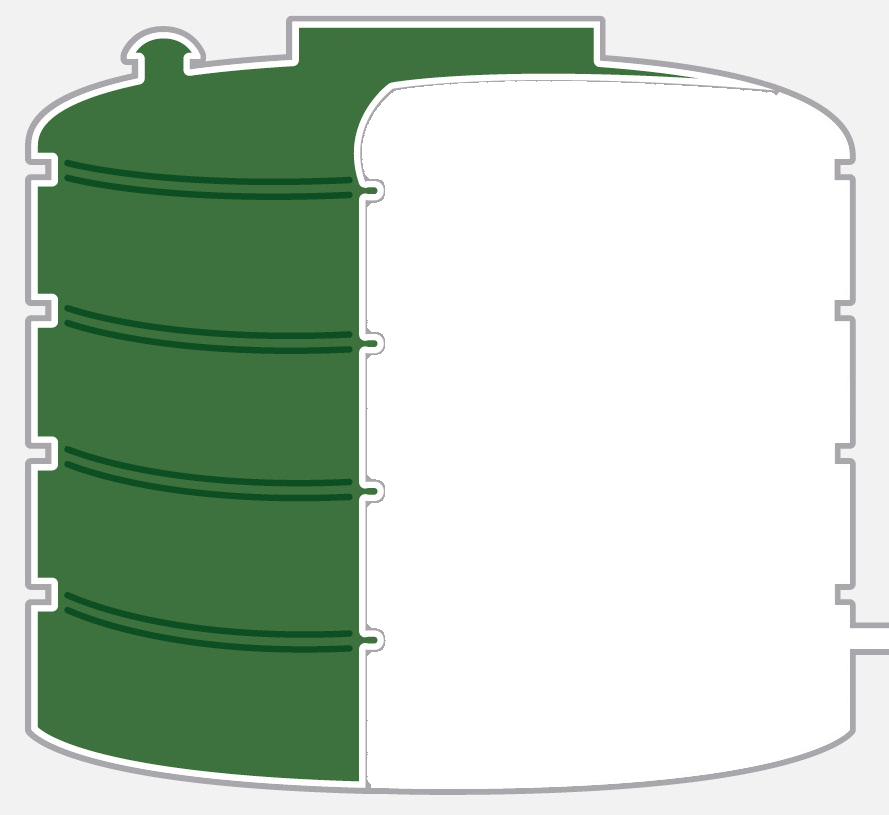
Hier das Bild als Download für den Behaelter: